
Slot Machine Simulator Philippines
Try our free Slot Machine Simulator for Filipino players. Adjust your virtual bet, simulate slot spins, and explore how RTP, variance, wins, and losses affect your balance over time.
300 Spin Results
- Final Balance
- —
- Actual RTP
- —
- Max Drawdown
- —
- Net Profit
- —
Simulation Settings
Adjust bankroll, bet size, volatility, RTP, and strategy.
Frequent smaller wins with smoother bankroll curves.
System Reading
Typical entertainment-style play.Useful for share cards or player examples.
- Volatility
- Low Volatility
- Hit Rate
- 38%
- Actual RTP
- —
Disclaimer
This simulator is a statistical model based on RTP and probability distributions. It does not represent the exact mechanics of any specific slot game.
Best Real Money Casino
Casino ranking data and outbound destination were not present in the collected source evidence.
Pending Business ConfigurationLast Updated Date:
Slot Machine Simulator Philippines
Open the AskSpinner Slot Machine Simulator and set your Starting Bankroll, Bet Per Spin, Maximum Spins, RTP, and Game Volatility. Then choose a betting strategy and click “Run Simulation.”
The simulator will show your Balance History, Actual RTP, Max Drawdown, and Final Balance, so you can see how different settings affect your simulated bankroll.
If you are new to the simulator, try ₱1,000 Starting Bankroll, ₱20 Bet Per Spin, 300 Maximum Spins, Low Volatility, and Flat Bet. After the first test, change one setting at a time to see the difference more clearly.
The RTP is the return rate used by the statistical model. If you set it to 96%, the Actual RTP of a single test can still be higher or lower than 96%.
How Should You Set the Starting Bankroll and Bet Per Spin?
Starting Bankroll is your balance at the start of the simulation. Bet Per Spin is your initial bet for each spin.
With ₱1,000 and a fixed ₱20 bet, you can cover 50 spins if there are no returns. With a ₱50 bet, you can cover 20 spins. If you receive returns during the test, the actual number of spins can be higher.
Maximum Spins is only the limit. The simulation can stop earlier if your balance cannot cover the next bet, so always check Spins Played.
If your betting strategy changes the bet after wins or losses, Bet Per Spin is only the starting bet. Later bets can become larger and may cause the simulation to stop before your balance reaches zero.
How to Read Volatility and Balance Changes
Game Volatility controls how often returns appear and how large they can be.
AskSpinner uses preset hit rates of 38% for Low, 28% for Medium, and 18% for High. Low volatility can produce more frequent smaller returns, while High volatility can produce longer losing periods and larger individual returns.
When comparing volatility settings, keep the Starting Bankroll, Bet Per Spin, RTP, and Maximum Spins the same. Then compare Balance History, Max Losing Streak, and Max Drawdown.
The same settings can still produce different results. Run the simulation several times to see how the balance can change.
RTP and Actual RTP
The RTP you enter is the model setting. Actual RTP is the result of the completed test.
Actual RTP = Total Returned ÷ Total Wagered × 100%
For example, if you wager ₱6,000 and receive ₱5,475.40, the Actual RTP is:
₱5,475.40 ÷ ₱6,000 × 100% = 91.26%
So a 300-spin test can show 91.26% even when the input RTP is 96%. Run it again and the result may change.
When comparing RTP settings, keep the other settings the same. For a specific slot game, check the RTP information provided for that game.
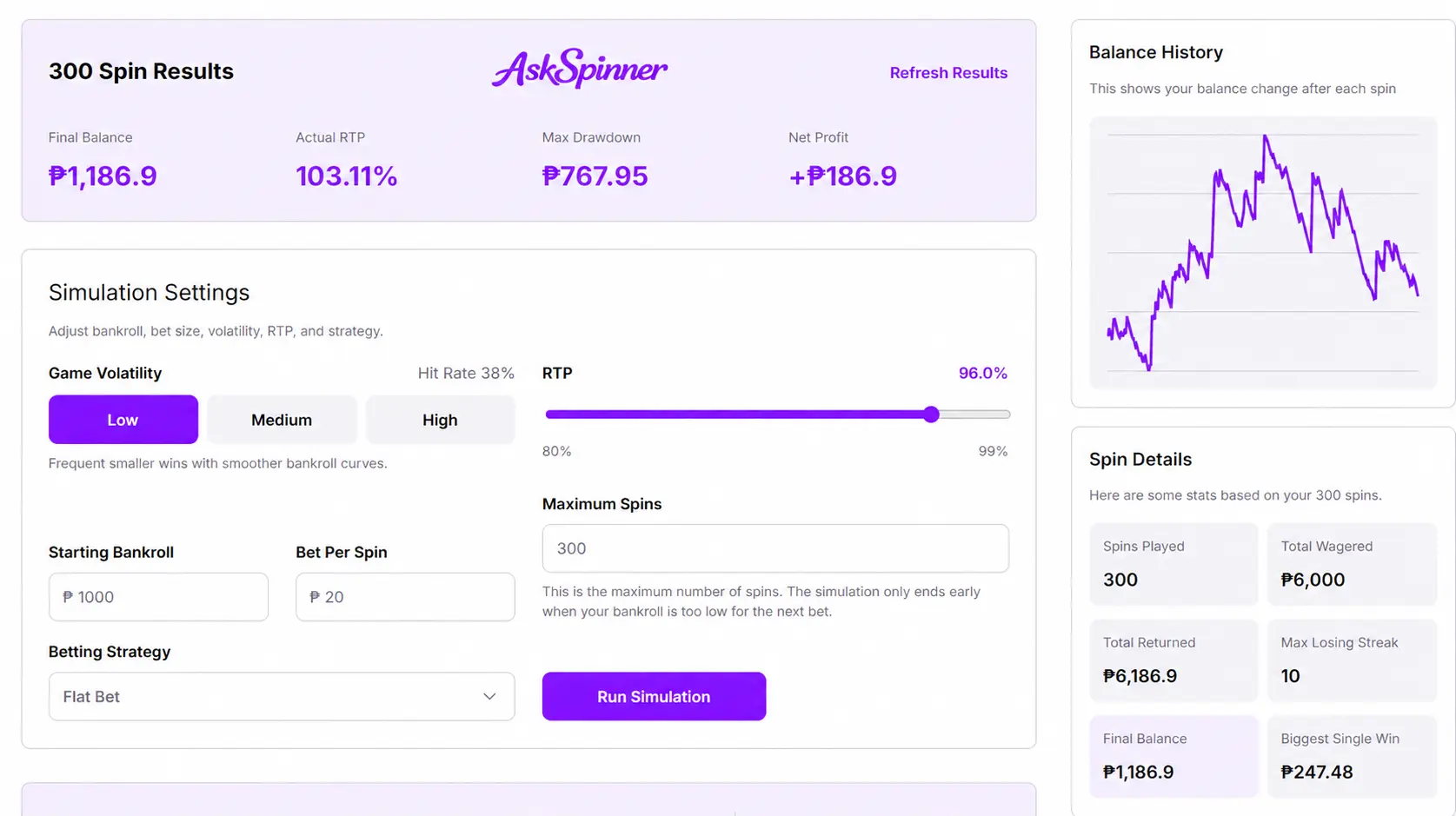
How to Read the Results
300 Spin Results shows Final Balance, Actual RTP, Max Drawdown, and Net Profit.
Spin Details includes Spins Played, Total Wagered, Total Returned, Max Losing Streak, Final Balance, and Biggest Single Win.
For example, if you wager ₱6,000 and receive ₱5,475.40, your Net Profit is −₱524.60. With a ₱1,000 Starting Bankroll, your Final Balance is ₱475.40.
Biggest Single Win shows your largest return from one spin, while Max Losing Streak shows your longest consecutive losing streak. Check Balance History to see how these results happened during the test.
What Does Max Drawdown Mean?
Max Drawdown shows the biggest drop from a previous balance high to a later low.
For example, you could start with ₱1,000, finish with ₱475.40, and still have a Max Drawdown of ₱978.86 if your balance rose first and then dropped sharply.
Final Balance shows where you ended, while Max Drawdown shows how far your balance fell during the test. Check both when comparing different settings.
Why Does the Simulation Stop Early?
Maximum Spins is only the upper limit. With a fixed ₱20 bet, the test stops when your balance falls below ₱20.
With a progressive strategy, the next bet may be even higher. For example, if the next bet is ₱40 but only ₱30 remains, the simulation will stop.
Check Spins Played and the final part of Balance History. A test that completes 300 spins and one that stops after 180 spins are not directly the same, even if their Final Balances are similar.
Compare Different Betting Strategies
Betting Strategy includes Flat Bet, Martingale, and Paroli.
Flat Bet keeps the bet fixed, while Martingale and Paroli change the next bet based on previous results.
For a fair comparison, keep the Starting Bankroll, Initial Bet, RTP, Volatility, and Maximum Spins the same. Then compare Final Balance, Max Drawdown, Spins Played, and Total Wagered.
Progressive strategies can increase your total wagering and may cause the simulation to stop earlier. They change your betting pattern, but they do not increase the RTP set in the simulator.
Click “Refresh Results” to run the same settings again. Before refreshing, record the Final Balance, Max Drawdown, and Spins Played. You can also switch the Betting Strategy and click “Run Simulation” to compare the results.
Running the same settings several times gives you a better idea of how the balance can fluctuate than looking at just one result.
The simulator helps you understand bet amounts, returns, losing streaks, and balance changes. For a specific slot game, also check its paytable, bonus features, and available RTP versions.
If you want to play more slot games, check AskSpinner’s slot game list.
Slot Betting Simulator FAQs
About The Author



Affiliate Disclosure
AskSpinner contains affiliate links and may earn a small commission from qualifying registrations. Our partnerships do not affect our rankings or reviews. All casinos are evaluated objectively based on expert reviews, Overall Score ratings, and real player feedback.
First Deposit Bonus Up to ₱900
Registration Bonus ₱20
Daily Task Rewards Up to ₱565
Coin Pusher Bonus Up to ₱2,000
First Deposit Bonus Up to ₱6