
Aviator by SPRIBE
Play Aviator by SPRIBE In Demo Mode
by Spribe



 Other SymbolPublic Multipliers
- Public outcomes
- Earlier flights
- Not personal exits
- No prediction
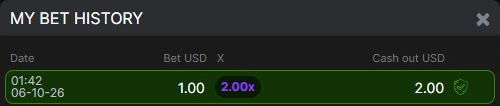 Other SymbolMy Bet History
- Personal record
- Stake and payout
- Exit multiplier
- Match current entry
 Other SymbolCash Out
- Active bet
- Live exit amount
- Before flight ends
- Payout includes stake
 Other SymbolCancel
- Queued bet
- Before round starts
- Cancel available
- Not a cashout
 Other SymbolBet
- Stake selection
- Before take-off
- Ready to enter
- One panel
Aviator by SPRIBE Expert Review


Updated:
Here you can find detailed review information about Aviator by SPRIBE.
A crash game built around one decision
Aviator by SPRIBE suits players who want a live cashout decision as a public multiplier rises.
What I liked
✅ The red plane and large multiplier make the cashout decision easy to grasp.
✅ Auto Bet and Auto Cash Out give automatic entry and exit distinct jobs.
✅ My Bet History makes personal results easy to check.
✅ Portrait-sized bet panels stack in a readable order.
✅ Different Bet, Cancel and Cash Out states make the controls easier to learn.
What I didn’t like
❌ A missed exit loses the full stake.
❌ Auto Bet and Auto Cash Out look too similar at first glance.
❌ Public wins and personal results are easy to confuse.
❌ Shallow landscape windows clip controls and menu entries.
❌ Animation cannot speed up the public round.
This review uses real FUN MODE screenshots and 100 confirmed settled demo bets to show how to distinguish public flight history, other players’ payouts and your own cashout, with the actual costs and the limits of the mobile-sized layouts.
This is a crash game, not a reel slot. There are no paylines to follow or Wild combinations to price. The supplier lists Aviator as a Mini Game; the defining interaction is an increasing public multiplier and a separate exit decision for each active bet.
Your browser does not support this video.
An unbet public flight rises from 1.04× to 4.80× and ends at 5.33×. Bet remains idle and Auto Bet is off, so this flight is separate from the 100 settled personal bets.
Philippines search interest. Ahrefs’ PH database, queried on 5 October 2026, estimated 300 monthly searches for “aviator game,” 150 for “aviator demo” and 60 for “aviator spribe.” These are separate keyword-search estimates, not player counts, and should not be added together. The broad word “aviator” also covers other subjects, so it is a poor standalone measure of interest in this game.
If the Aviator demo is available in the game area on this page, use it here to learn the controls with simulated funds. Availability of the embedded demo still needs checking on the device and connection you use.
Finding your way around the screen
The dark canvas and large central multiplier keep the flight easy to follow. The smaller numbers are more important for checking a result: your wallet is at the top right, your stake is in the active panel, and the receipt is in My Bet History. The public list at the left can look like a feed of winnings from your account; it is not.
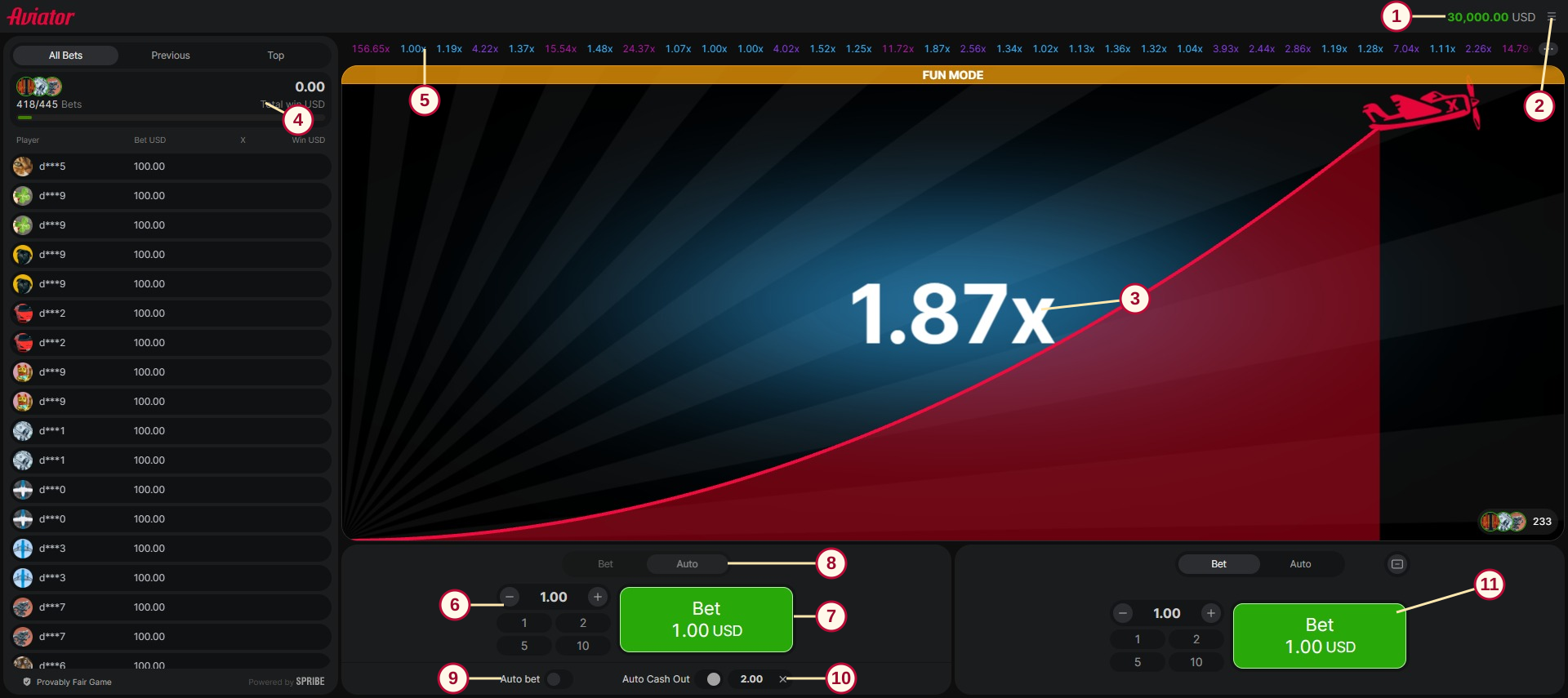
Actual 1920 × 855 desktop viewport. Numbered markers identify the real interface; the pictured public flight is not itself proof of a bet. The left Auto tab shows the review setup, while the right panel remains unused.
Wallet: the account’s displayed balance, here in simulated USD.
Menu: opens settings, personal history, limits and the rules.
Current multiplier and plane: the public flight’s progress. It is not automatically your cashout multiplier.
Public bets and totals: All Bets, Previous and Top concern public activity and other players.
Recent public multipliers: outcomes of earlier flights, not a record of your personal exits or a prediction of the next round.
Left stake controls: the amount field, minus/plus buttons and preset amounts.
State-changing action: green Bet, red Cancel while queued, or orange Cash Out during an active bet.
Bet / Auto tabs: switch the panel view. Selecting Auto is different from enabling Auto Bet.
Auto Bet: the switch for placing future bets automatically.
Auto Cash Out: the separate switch and multiplier target; the review used 2.00×.
Second panel: a separate bet panel. It is visible here, but only the left panel was used for the settled sample.
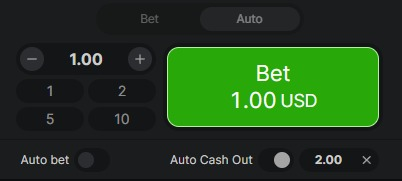
Detail of the left panel. The 1.00 stake and 2.00× cashout target have different jobs; neither is a guarantee of receiving a payout.
The menu separates Sound, Music and Animation from Free Bets, My Bet History, Game Limits, How To Play, Game Rules and Provably Fair Settings. Animation changes the plane’s visual display. It is not a Turbo setting and does not promise to shorten the public round. No Turbo, EX or Buy Bonus control appeared in the inspected main screen, menu or complete visible rules. Sound and Music controls were visible, but audio quality was not tested.
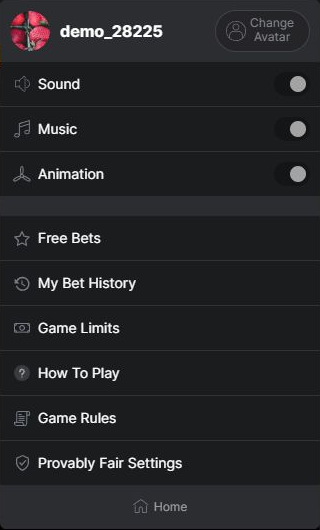
The real expanded menu. Free Bets is a menu entry, not a purchase button; Provably Fair Settings is an available entry, not evidence that a fairness check has been completed.
Portrait works more naturally than a shallow landscape window
At a desktop-simulated 390 × 844 viewport, the two bet panels stack vertically and the public bets section moves beneath them. The amount and primary action stay prominent, while less of the public list fits into the first screen. The menu and Game Rules opened successfully. This is the layout I would choose for learning where everything is.
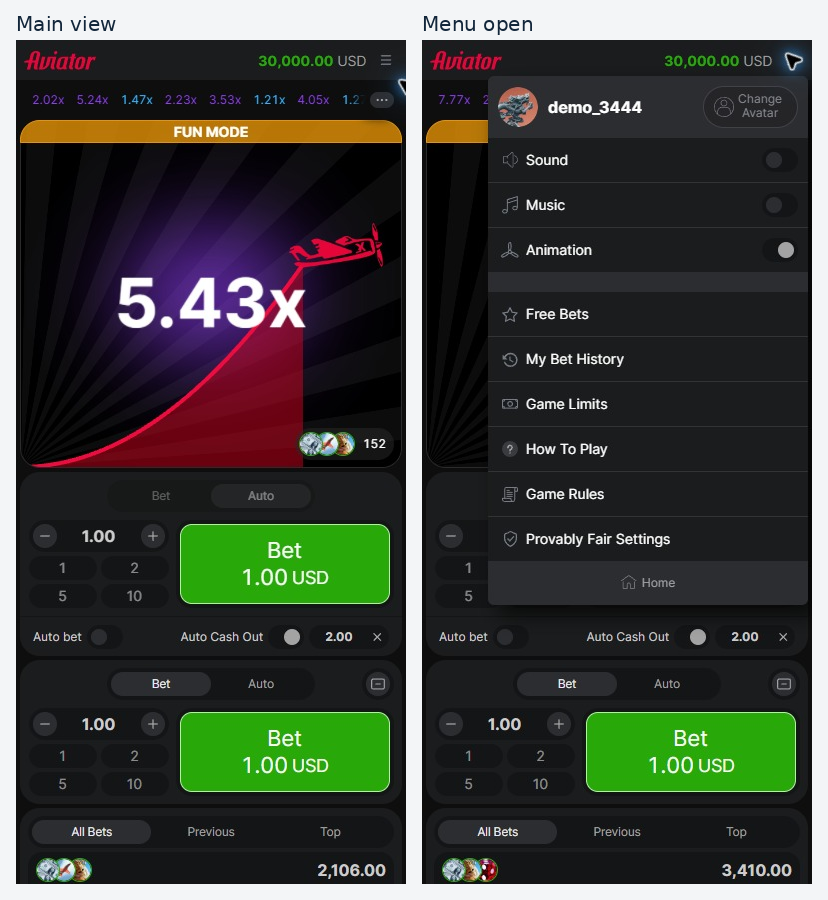
Main view and open menu in separate 390 × 844 desktop viewport simulations. The public flight continues between captures; these are not physical-phone screenshots or one shared instant.
The 844 × 390 landscape check was less comfortable. Initially the bet panels fell below the bottom of the viewport. Switching both panels to their Auto tabs caused the layout to reflow and brought the controls into view; both Auto Bet switches stayed off. That distinction matters: opening an Auto tab did not place a bet.
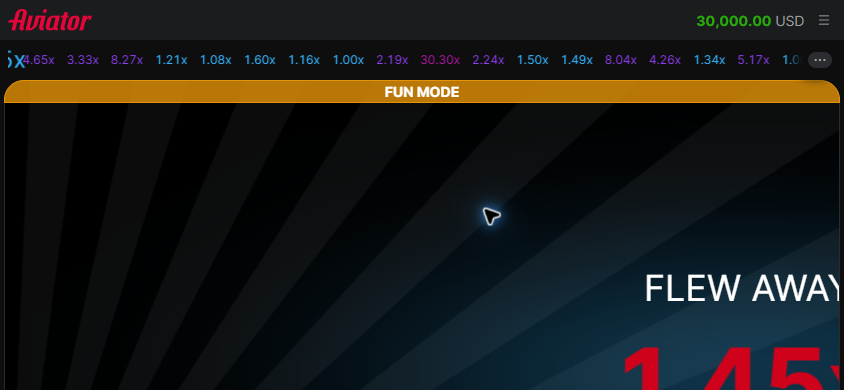
Landscape before the tab change at the actual 844 × 390 viewport. This view shows the initial clipping problem.
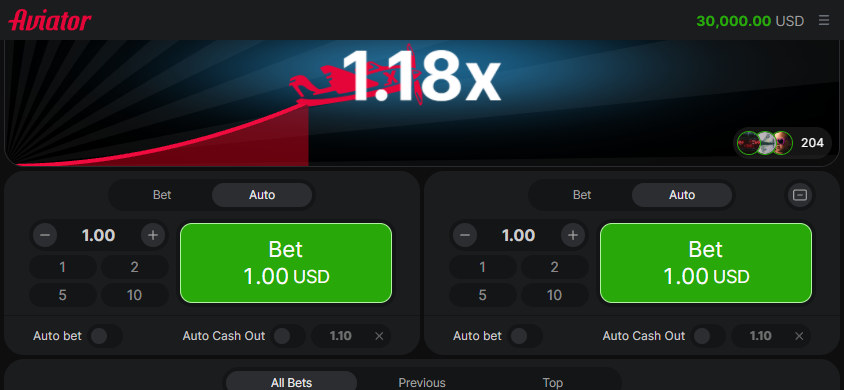
Landscape after the tab change at the same 844 × 390 viewport. The observed reflow does not establish that every landscape state works correctly.
The landscape menu still had a practical snag: Game Rules sat below the 390-pixel screen at about y448. Scrolling did not reveal it, and the first attempted selection did not open the rules. The rule panel was then opened at desktop size and resized to landscape. Its text was readable and it scrolled successfully, which proves that the open panel can reflow, but does not prove the clipped menu route works.
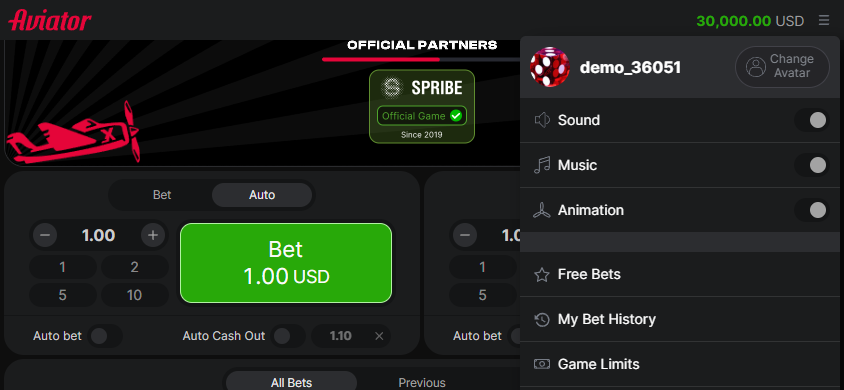
Actual landscape menu: the lower entries are outside the visible window. Only the top of Live Bets was checked in this layout.
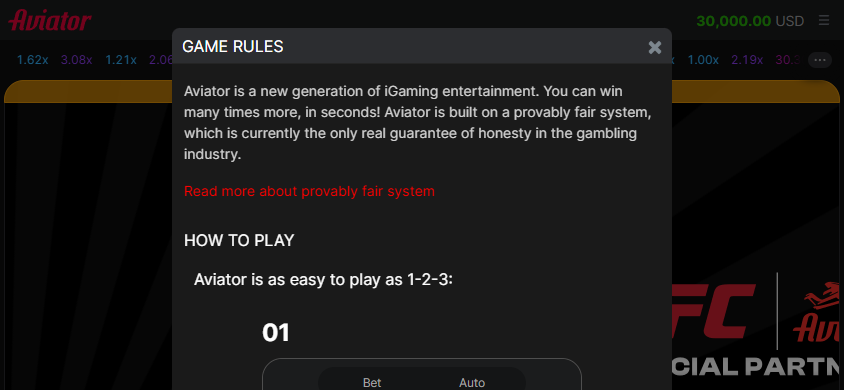
Game Rules was opened at 1920-pixel desktop width first, then resized to 844 × 390. The text remained readable.
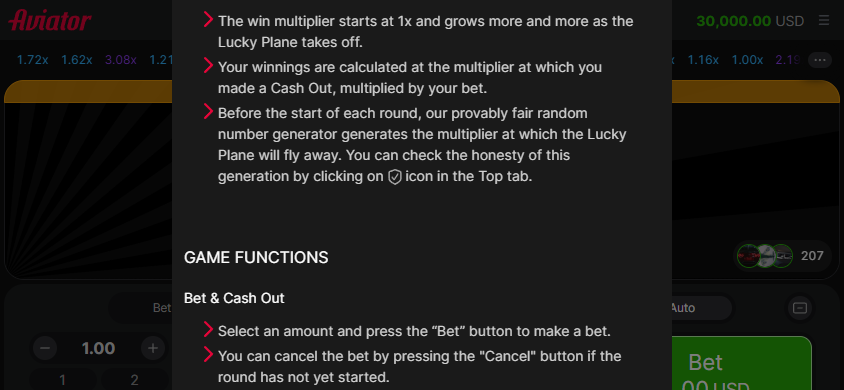
The same resized Game Rules panel scrolled successfully. This does not erase the landscape menu-access limitation.
All device-size checks used desktop mouse control. They do not establish real-phone touch responsiveness, mobile operating-system playback or performance on a Philippines network.
How a bet wins, and what the numbers mean
Choose the amount for the panel you intend to use. The inspected interface allows minus/plus adjustments, presets or direct entry.
Place the bet before its flight starts. A queued panel shows Cancel; the rules allow cancellation before that round begins.
During an active bet, Cash Out exits at the current available multiplier. Auto Cash Out can instead request an exit at a preset target.
If the plane flies away before the bet is cashed out, that bet is lost. An unbet public flight never creates a payout for your wallet.
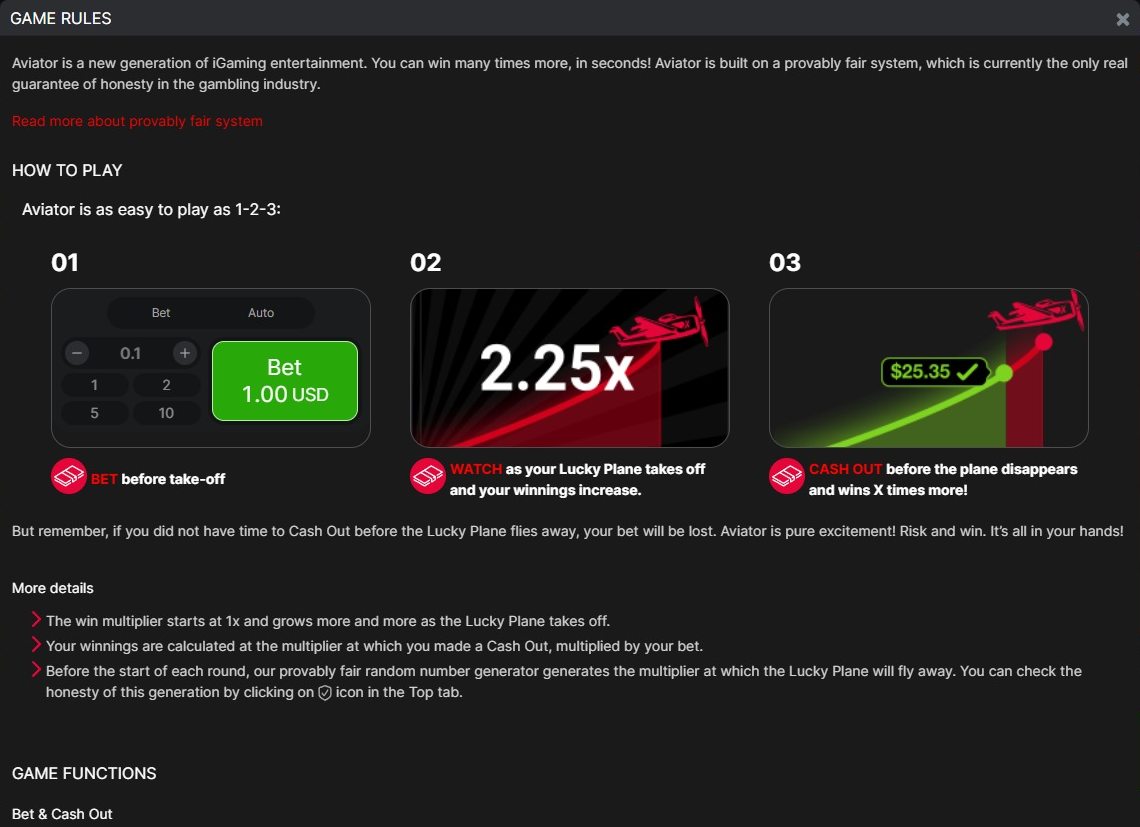
The game’s own Help illustration explains the three-step mechanism. Its pictured amounts are instructional examples, not transactions from our 100-bet sample.
Payout and profit are different. A 1.00 bet cashed out at 2.00× returns 2.00 in total: 1.00 × 2.00 = 2.00. After the 1.00 cost, the net gain is 1.00. A bet that loses before that exit returns no payout and has a net change of −1.00. The formula explains the rule; the sample totals below use confirmed personal receipts.
The live Cash Out amount is an available exit amount while the bet is active, not a banked win. Likewise, a flight that continues after your cashout does not increase a finished bet’s payout. This is the main reading habit to learn before comparing any results.
Display | What it tells you | What it does not establish |
|---|---|---|
Central flight multiplier | Where the public flight is now, or where it ended | Your personal exit or banked payout |
My Bet History | Your bet amount and recorded cashout for that entry | That every listed old entry belongs to the current test |
Public multiplier strip | Results from prior public flights | The next flight’s outcome |
All Bets / public win list | Activity and payouts of displayed participants | Money credited to your own wallet |
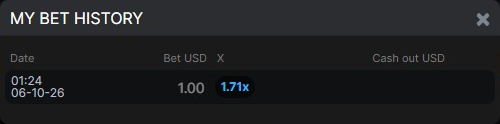
A real loss from completed bet 1: the personal cashout cell is blank after a 1.71× loss with a 2.00× target. The zero payout in the analysis follows that result and the loss rule; the screenshot does not literally display “0.00.”
Bet, Cancel and Cash Out describe the state of your own panel. Check My Bet History for the personal receipt and the public multiplier strip for earlier flights.
Auto Cash Out, Auto Bet and a real 2.00× exit
Auto Cash Out removes the need to choose a manual click at the exact target, but it does not make that target certain to arrive. Auto Bet answers a different question: whether another stake should be placed automatically. Check them separately. A visible Auto tab alone does not mean either switch is on.
Control | Job | What was actually observed |
|---|---|---|
Auto tab | Reveals automatic-control settings | Opened in desktop, portrait and landscape views |
Auto Bet | Places future bets automatically when enabled | One sample bet, number 13, started during an actual Auto Bet inspection; continuous queuing was then stopped |
Auto Cash Out | Exits an active bet when its entered multiplier is reached | Set to 2.00× for the 100 confirmed settled bets; all 43 confirmed cashouts returned 2.00 on a 1.00 stake |
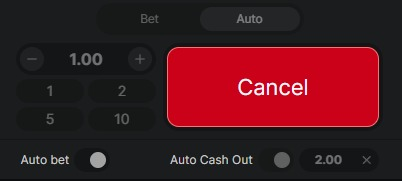
An active Auto Bet state, not a passive settings inspection. Bet 13 began through Auto Bet.
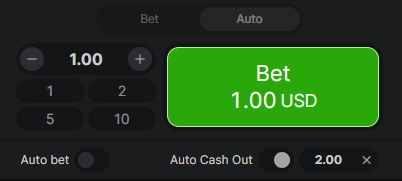
Auto Bet after it was stopped. The control state does not by itself establish an additional completed bet or a refund.
Completed bet 8: the public flight continues after the personal exit
Bet 8 makes the distinction particularly clear. The wallet was 29,998.00 before the 1.00 stake, then 29,997.00 after the debit. During the flight, the active orange button showed Cash Out 1.65 USD. A later frame shows the personal 2.00× cashout receipt and 2.00 USD win while the central public multiplier has already reached 2.25×. The final personal history confirms Bet 1.00, exit 2.00× and payout 2.00; the wallet was 29,999.00.
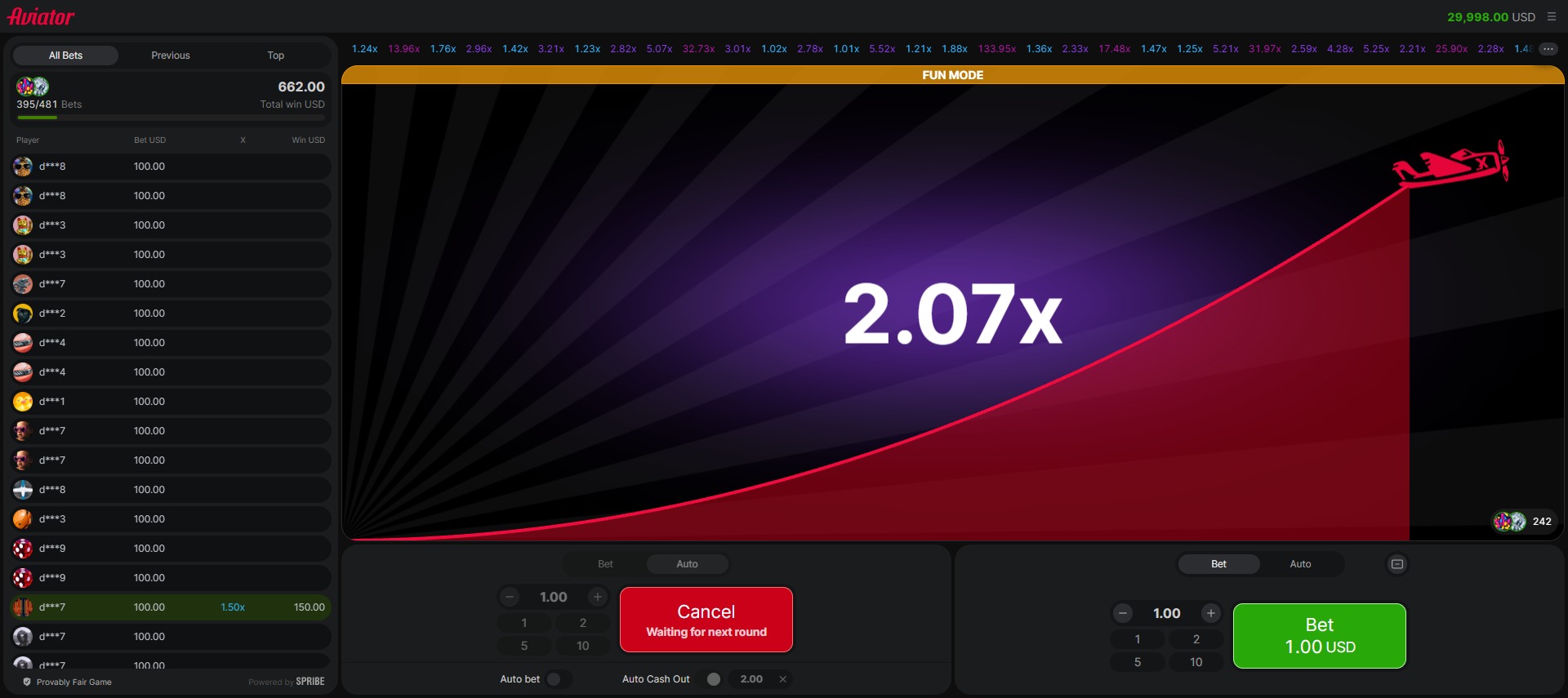
Bet 8, queued before its own flight. The public 2.07× on screen belongs to the flight already in progress; the button explicitly says “Waiting for next round.”
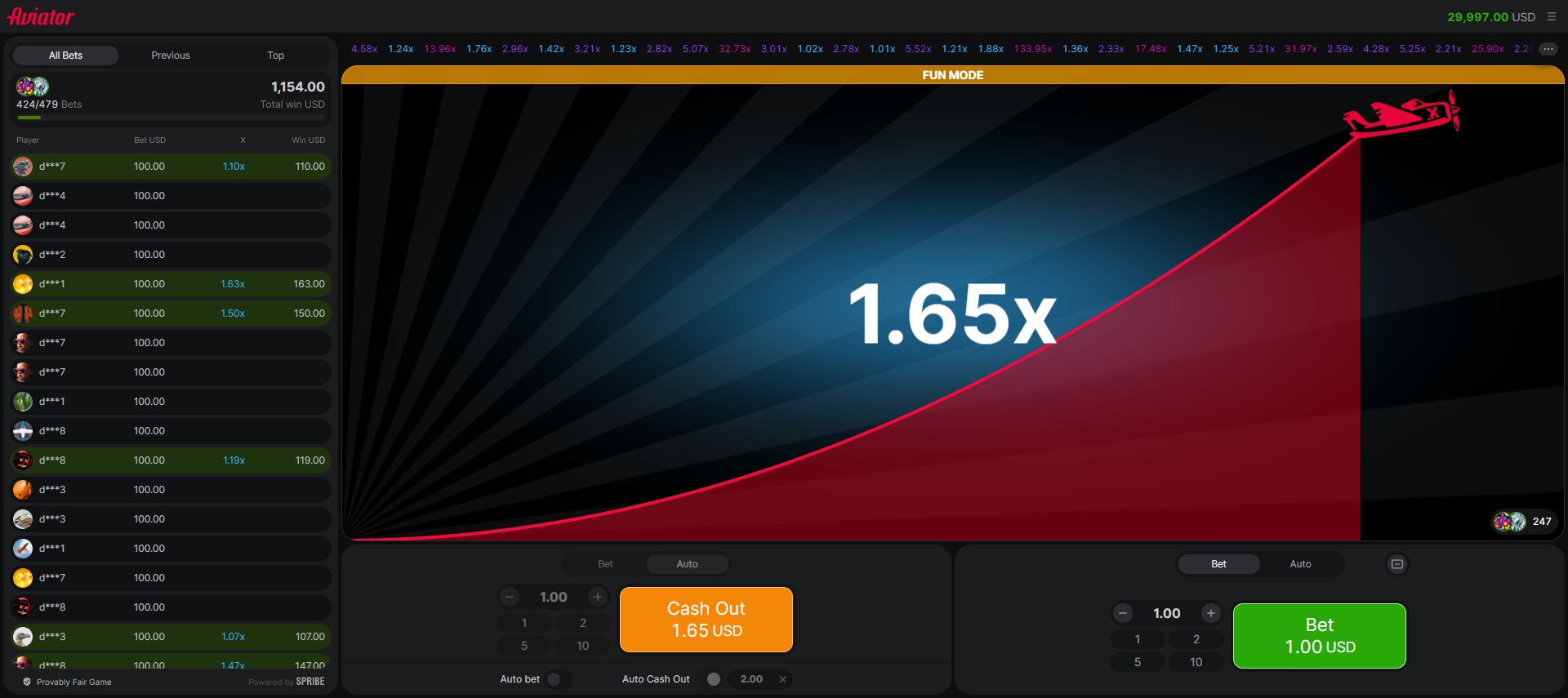
Bet 8 in flight: the 1.00 stake is active, the wallet reads 29,997.00, and Cash Out currently offers 1.65 simulated USD. That amount has not yet been credited.
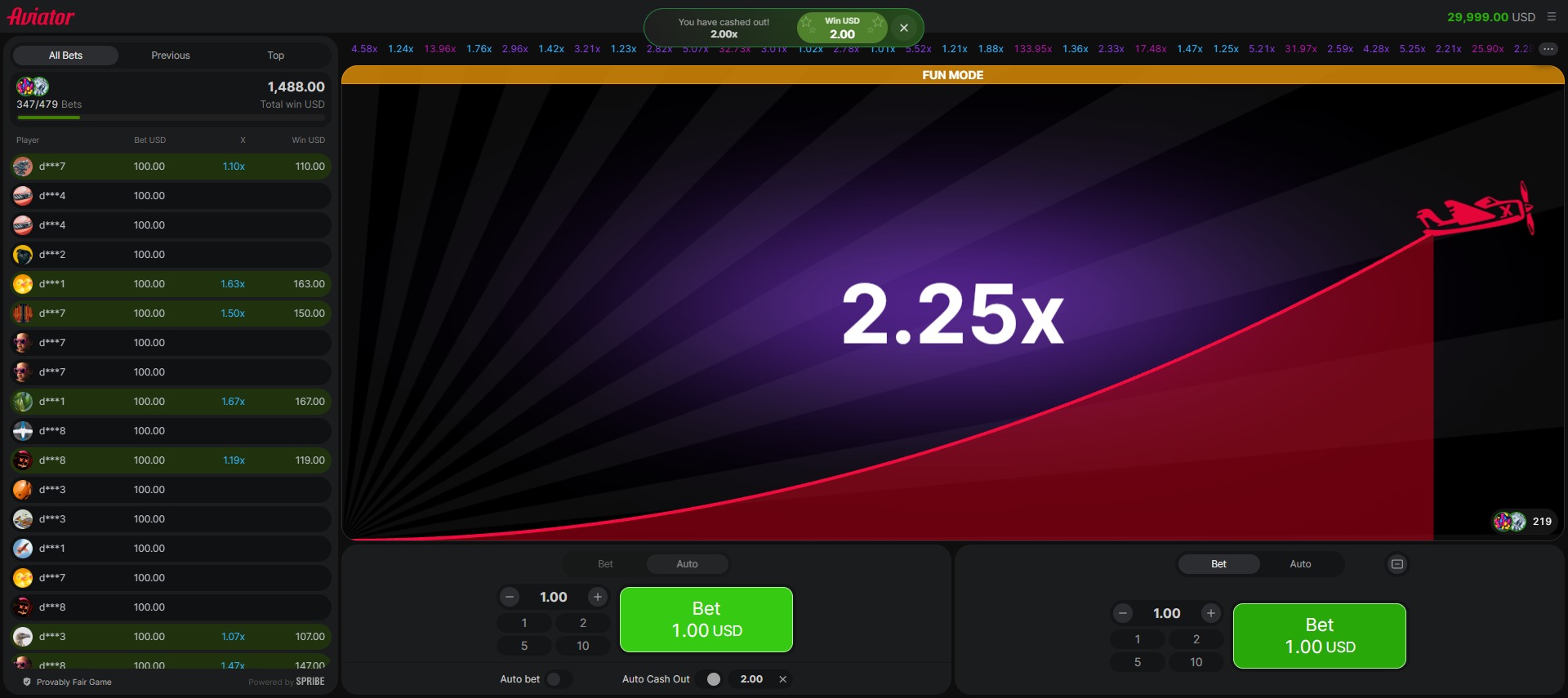
Bet 8 has cashed out at 2.00× for 2.00 simulated USD. The public flight continues to 2.25× in this frame; the extra public movement is not an additional personal return.
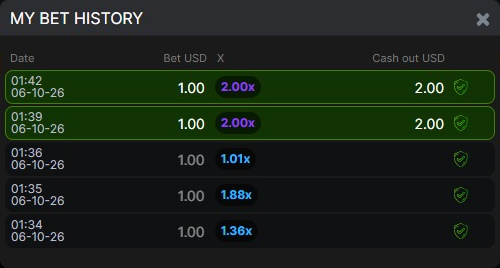
The newest, first row is bet 8’s personal receipt. Its 2.00× value records the exit, not the eventual public crash multiplier. The earlier rows belong to earlier settled bets.
The interface supports two bet panels, and Help describes two simultaneous bets. Only the left panel was paid and evaluated here. Seeing the right-hand green Bet button does not mean a second stake was placed, and the sample does not test two-bet settlement.
Extra entries in Help
Free Bets can be awarded by the operator or through the Rain feature according to Help. No eligible free bet was received or used in this test. It is therefore an explained feature, not a recorded bonus win, and it should not be confused with a slot’s Buy Bonus.
Help also describes a Provably Fair system, an automatic cashout on interrupted connections and void/refund handling for malfunctions. Those are supplier rule statements. No seed, hash or algorithm was independently checked here, and the three interrupted paid attempts in the records cannot be assigned refunds or payouts simply by quoting those rules.
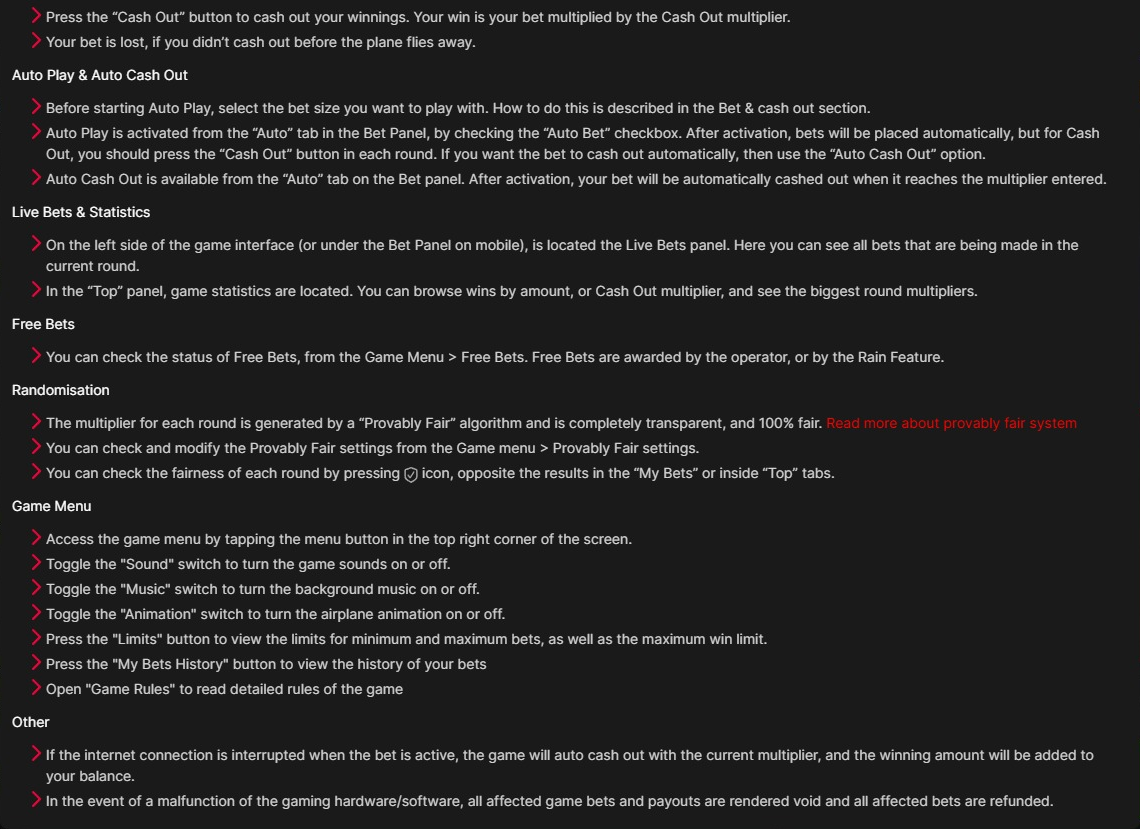
Original Help coverage for the additional features and recovery statements. These rule descriptions are distinct from features successfully triggered or settlements actually observed.
Bet limits, RTP and the cost of the target
The tested FUN MODE displays USD. Every amount in this review is simulated USD, not PHP and not real money. The selected plan was one left-panel bet of 1.00 with Auto Cash Out at 2.00×. It carries a full 1.00 loss if the flight ends before the exit; the target is a setting, not a promise.
Item | Source-backed value | How to read it |
|---|---|---|
Minimum single bet | 0.10 simulated USD | Shown in Game Limits; no 0.10 bet was tested |
Maximum single bet | 100.00 simulated USD | Shown in Game Limits; no 100.00 bet was tested |
Maximum win for one bet | 10,000.00 simulated USD | An amount cap, not a universal 10,000× multiplier |
Review stake / exit target | 1.00 / 2.00× | One left-panel bet at a time in the confirmed sample |
Supplier’s public RTP | 97% | Official product-page claim; the current demo backend configuration was not independently established |
Supplier volatility label | Not verified in the supplied evidence | The short sample does not establish theoretical volatility |
Maximum public crash multiplier | Not verified | Do not substitute the monetary win limit for a multiplier cap |
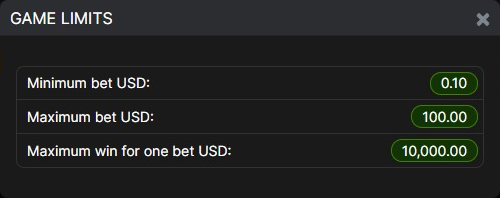
The actual Game Limits panel. The final line is explicitly an amount for one bet, so it should not be relabelled as a universal maximum multiplier.
SPRIBE’s Aviator product page publicly lists 97% RTP. That is a theoretical return parameter, not a promise that an individual session will return 97% of its cost. The captured product panel also lists Desktop, Tablet and Mobile; that is a supplier compatibility claim, separate from the specific viewport checks above.
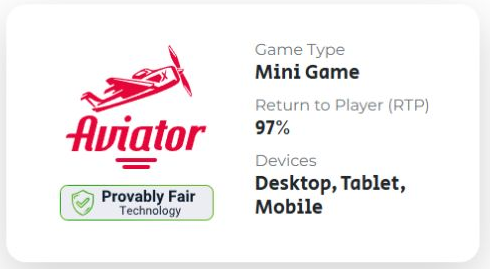
Supplier product-page information captured on 5 October 2026 UTC. It is evidence of the public 97% claim, not confirmation of the demo server’s configuration.
The sample’s 86% return answers a much narrower question: how much the 100 confirmed settled bets paid back under the recorded plan. It cannot verify or disprove 97%, establish an exact probability for a 2.00× exit, or prove an advantage from a cashout setting. Recent public multipliers are not a demonstrated predictor.
For a simple explanation of how stake, payout and sample return interact, the slot simulator can be used as a generic educational tool. It does not reproduce Aviator’s unverified algorithm and must not be used as an Aviator predictor.
What happened in 100 confirmed settled demo bets
The playtest took place on 5 October 2026 UTC, or 6 October in the Philippines, in FUN MODE across four demo sessions. All 100 confirmed settled entries use the left panel, a 1.00 stake and a 2.00× Auto Cash Out target. There were 99 manually accepted bet inputs and one actual Auto Bet-started exception at bet 13. Public flights without a personal bet are excluded.
Confirmed sample only; all amounts are simulated USD
Confirmed result | Bets | Cost | Payout | Net change |
|---|---|---|---|---|
Cashed out at 2.00× | 43 | 43.00 | 86.00 | +43.00 |
Lost before the target exit | 57 | 57.00 | 0.00 | −57.00 |
Confirmed settled total | 100 | 100.00 | 86.00 | −14.00 |
Sample return: 86.00 ÷ 100.00 = 86%. The sample had 43 net-profitable bets, 57 net-losing bets and no break-even bets. Every successful 2.00× exit returned 2.00 including the stake, leaving +1.00 net. Every loss had −1.00 net.
Three additional paid attempts remain unresolved. Each has a confirmed 1.00 cost but no confirmed final personal settlement. They are excluded from the settled-sample charts, not counted as losses or refunds. Across all 103 observed paid attempts, the known cost is 103.00; the total payout, net change and return remain unknown.
The wallet line needs its session breaks
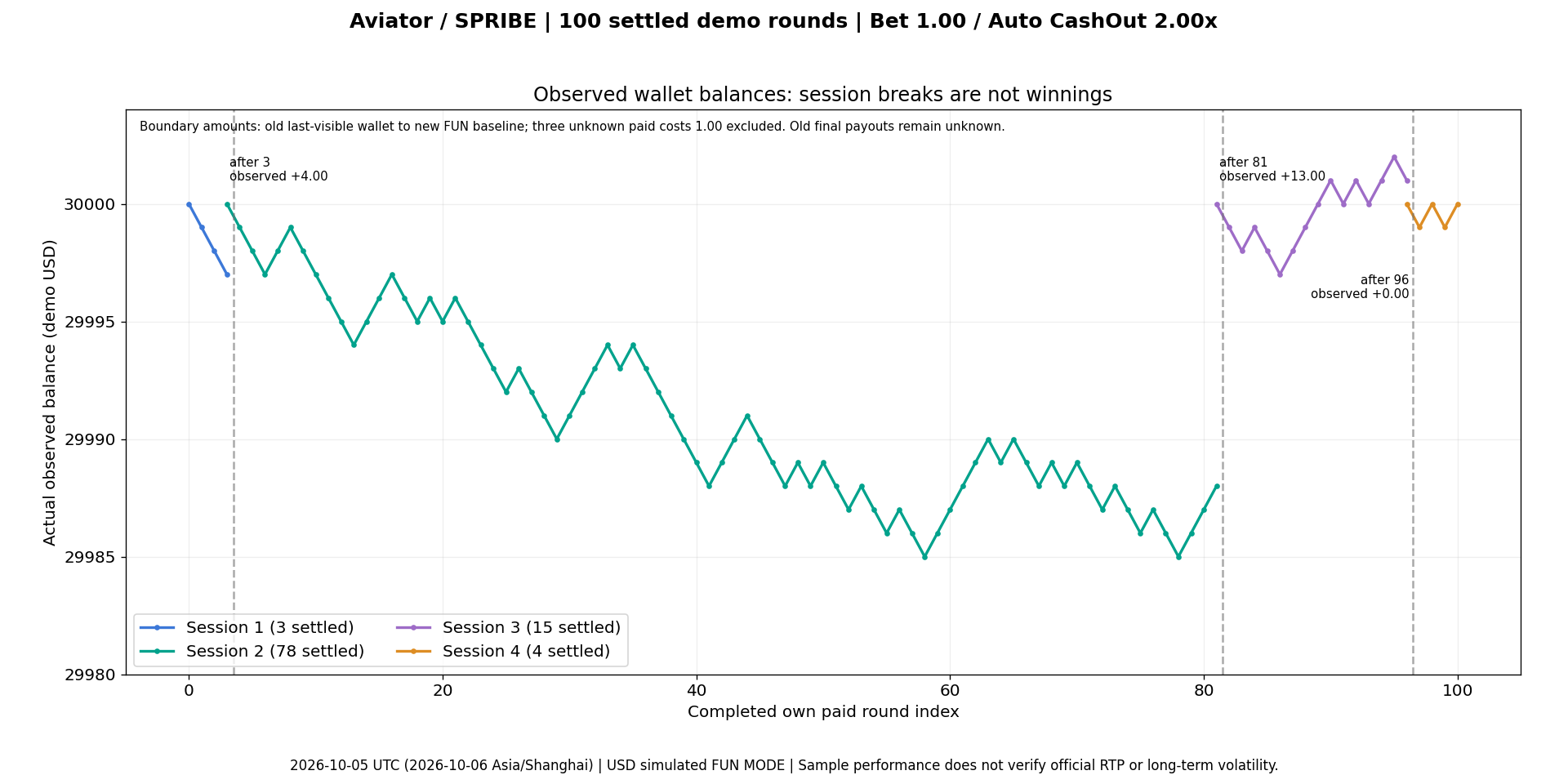
Confirmed personal wallet observations, split at the four sessions. The labelled +4, +13 and +0 changes compare an old last-visible wallet with a fresh FUN MODE baseline; the old final settlements are unknown. They are not winnings or confirmed refunds.
The final displayed wallet returned to 30,000.00 in session four, but that does not mean the test broke even. Fresh demo baselines interrupted the wallet series. The settled-bet ledger is the appropriate place to total cost and payout; joining the sessions into one continuous balance line would hide those resets.
Cumulative return stays tied to the same 100 bets
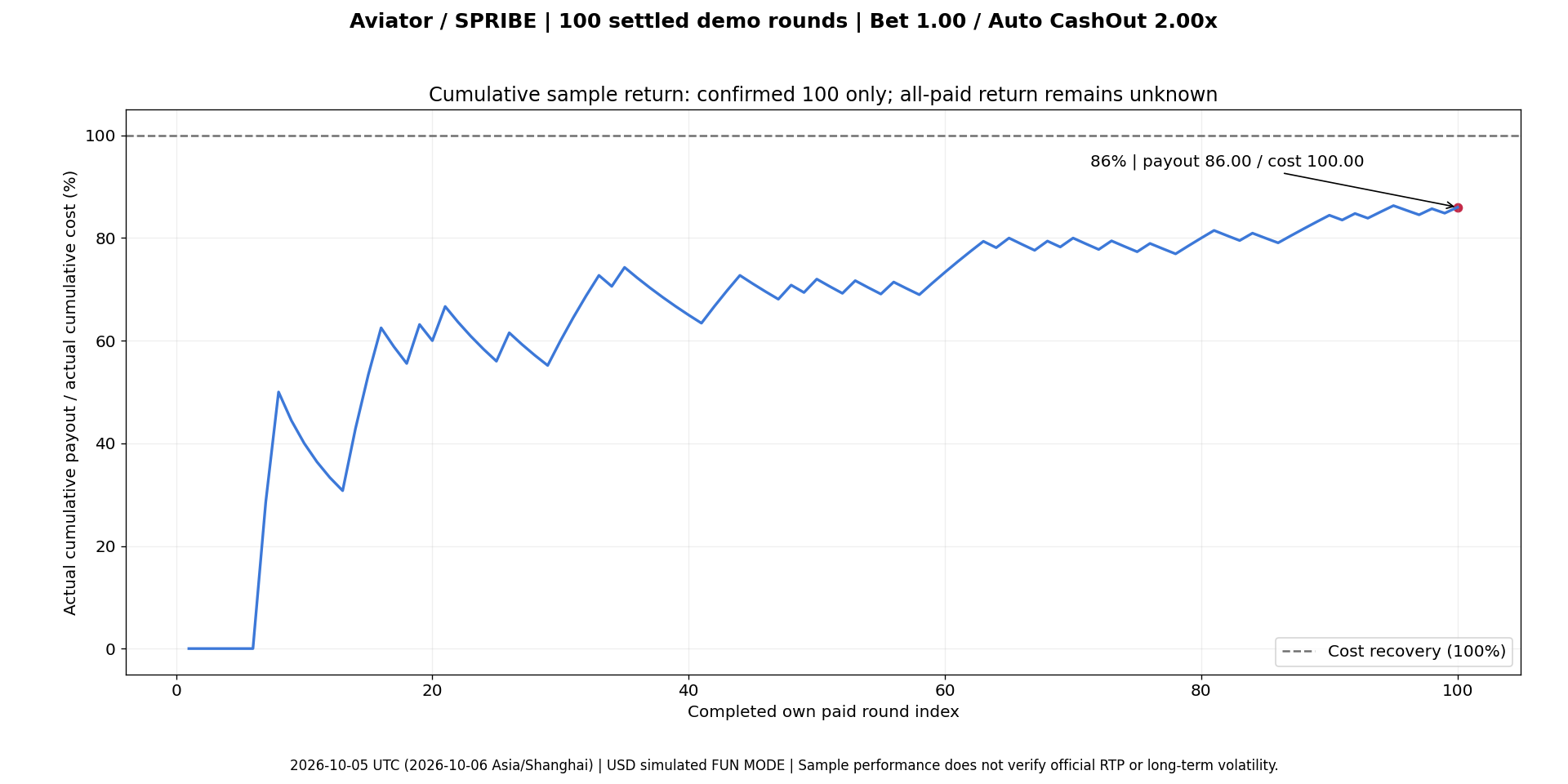
Cumulative payout ÷ cumulative cost, from confirmed bet 1 through confirmed bet 100. The 100% reference is cost recovery; the final point is 86%. Session changes do not restart this denominator. The three unresolved paid attempts are excluded.
Each net result includes its stake
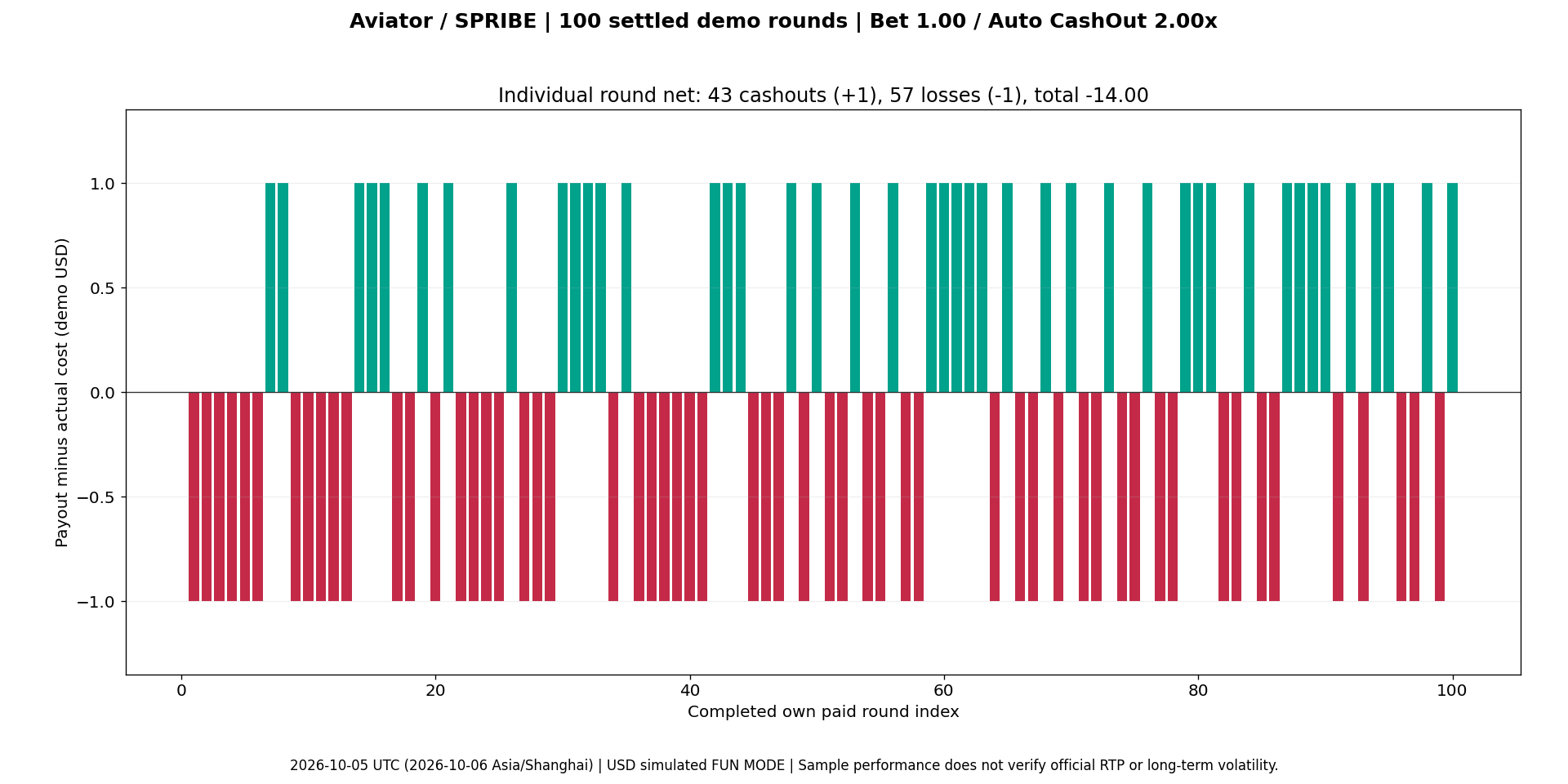
Each bar is the complete personal payout minus the 1.00 cost: 43 bars at +1.00 and 57 at −1.00, totalling −14.00. The chart says nothing about the profitability of a future session.
The practical lesson is easy to see: an automatic exit can be working exactly as configured while many flights still end before the target. A cashout target is an execution control. It does not remove the risk of losing a stake or turn a short set of results into a winning method.
For transparency, three debit-phase wallet readings were not captured, and one further debit reading came from the visible page text after its screenshot failed. Personal histories and final observations support the completed settlements; missing intermediate amounts were not filled by subtraction. Bet 13’s exact input time is also unavailable. These source gaps do not justify inventing extra outcomes or calling the whole run manual.
Our verdict: clear tension, with interface trade-offs
Editorial score: 7.5/10. Aviator communicates its central risk quickly, and the colour-changing action button plus personal history make the mechanics teachable. I value those more than the spectacle of a large public multiplier. The score loses ground for the ease of confusing public activity with personal return and for the clipped shallow-landscape layout. It is a judgment of the design and observed usability, not a rating derived from the −14.00 sample result.
Aviator or Fortune Tiger? Choose the interaction you want
The useful comparison with Fortune Tiger by PG SOFT is the structure of the decision. Fortune Tiger’s verified rules describe a 3 × 3 reel slot with five fixed paylines. Its result comes from the symbols and feature rules, while Aviator asks whether an active bet should be cashed out before its public flight ends. These are different kinds of attention, not competing short-session profit records.
Dimension | Aviator by SPRIBE | Fortune Tiger by PG SOFT |
|---|---|---|
What you watch | Public flight multiplier and your active bet state | Three reels, three rows and five fixed paylines |
How the payout is read | Your accepted cashout multiplier × your stake | Matching symbols on a line, using the paytable and bet settings |
Distinctive mechanism | Cashout timing; separate automatic entry and exit controls | A randomly triggered respin feature and a 10× multiplier when every symbol participates in a win |
Automation and speed | Auto Bet and Auto Cash Out; no Turbo observed | Selected-count Auto Spin and Turbo Spin described in its rules |
Better fit | Someone who wants to understand a live exit decision | Someone who prefers reading completed symbol combinations |
My recommendation is to learn Aviator slowly in FUN MODE, with one panel, before deciding whether its cashout interaction is appealing. Watch your own button state and personal history rather than the public winners feed. If you prefer a result that settles through symbol rules without a live cashout decision, the Fortune Tiger format will be the more natural starting point.
Keep any real-money play within a preset entertainment budget and time limit. Neither a run of low multipliers, a “predictor” claim nor a recent set of cashouts establishes what the next flight will do.
Aviator by SPRIBE FAQs
Answers to common questions about Aviator by SPRIBE.
Aviator by SPRIBE Reviews
 No Player Reviews Yet
Played Aviator by SPRIBE? Share your experience with other players.
 Write A Review