
Roulette Simulator Philippines
Try our free Roulette Simulator for Filipino players. Place virtual bets, spin the wheel, and explore roulette odds, payouts, and results without risking real money.
EU · 100 spins · ₱100 · Flat Betting
Place Your Bets
- Total Bet
- ₱0
- Starting Balance
- ₱100
Simulation only. No real-money bets are placed.
Result Per Spin
| Spin | Number | Status | Bet | Payout | Balance |
|---|
No spin results yet.
Simulation History
| Test | P/L | ROI | Balance | Details |
|---|
No simulation history yet.
Last Updated Date:
Roulette Simulator Philippines
After opening the AskSpinner Roulette Simulator, select the roulette version and number of spins you want to simulate, then place your chips directly on the virtual roulette table.
After you run the test, the result of each spin, bet amount, and practice balance will be recorded, allowing you to see more clearly how different betting methods perform over a period of time.
If you are using the simulator for the first time, you can start with a simple setup, such as a ₱100 Starting Balance, select European Roulette, and place a ₱1 chip on Red. This allows you to first become familiar with the roulette table layout, chip placement, and how each spin is settled before trying other roulette versions or betting methods.
Roulette Version determines which type of roulette you are using. All three versions have numbers 1–36, but the biggest difference is the number of zeroes.
Red covers 18 numbers in all three versions, so as the number of zeroes increases, the chance of the same Red bet landing on a red number also decreases.
If you want to compare different betting methods, it is recommended to keep the Roulette Version fixed and then change the betting position. This reduces the impact of other rule differences on the test results and makes it easier to understand the results produced by each betting method.
How Does European Roulette Work? The Roulette With One Zero
European Roulette has 37 slots, including numbers 1–36 and one 0. A Red bet covers 18 of these numbers, so the chance of landing on Red on one spin is:
18 ÷ 37
If the ball lands on 0, a standard Red bet loses.
The AskSpinner Roulette Simulator uses European Roulette as the default version. If you are new to roulette, you can start with this version to become familiar with the number areas, Red and Black bets, and how each spin is settled.
How Does American Roulette Work? The Roulette With Two Zeroes
American Roulette has one additional 00 compared with European Roulette, for a total of 38 slots, including 1–36, 0, and 00.
Red still covers 18 numbers, so the chance of landing on Red on one spin is:
18 ÷ 38
You can switch to American Roulette and use the same betting method for the test, then review the records generated. The profit or loss on each individual simulation will vary randomly, but the rule difference between the two versions is clear: American Roulette has an additional 00.
Triple Zero Roulette: The Roulette With Three Zeroes
Triple Zero Roulette has 39 slots, with the zeroes 0, 00, and 000. Red still covers 18 numbers, so the chance of landing on Red on one spin is:
18 ÷ 39
This is the lowest ratio among the three roulette versions. None of the three zeroes are Red, so if the ball lands on 0, 00, or 000, a standard Red bet loses.
If you are choosing a roulette game at a casino, you can first check how many zeroes are on the table, then select the corresponding version in the simulator for testing.
Click here to view AskSpinner’s roulette games.
How to Use the Roulette Simulator
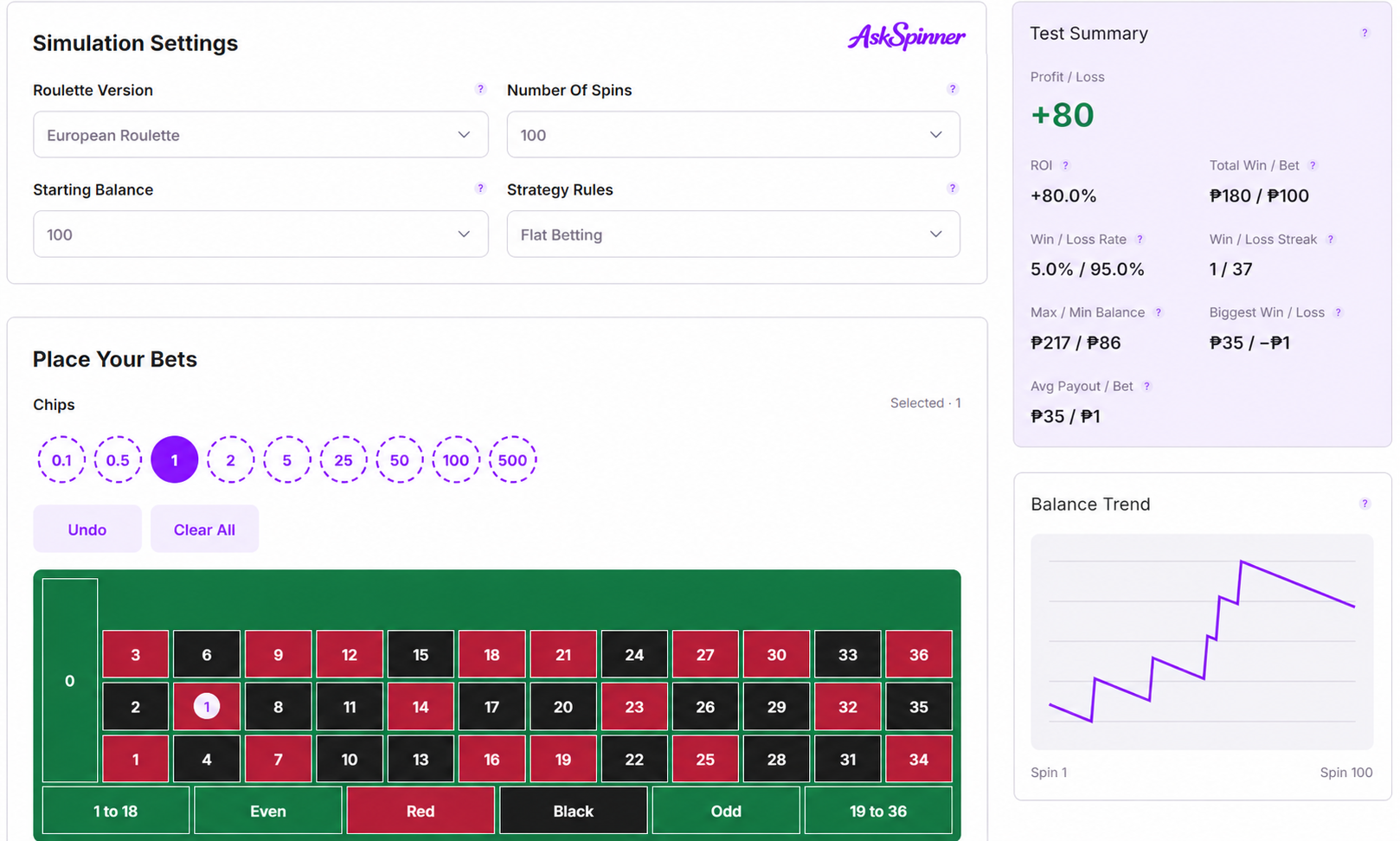
After selecting the Roulette Version, select a chip denomination under Chips, then click the position where you want to place your bet. For example, select a ₱1 chip and click Red, and a ₱1 Red betting chip will appear on the table.
In addition to betting areas such as Red, Black, Odd, and Even, you can also place a chip directly on a single number. A Red bet covers 18 numbers and has standard odds of 1:1, while a straight-up bet on a single number covers only one number and has standard odds of 35:1.
The two betting methods have different coverage and payouts for each win. For example, if you place a ₱1 chip on Red and another ₱1 chip on a single number, Total Bet will show a total of ₱2 per spin.
If you place a chip in the wrong position, you can use Undo to remove the most recently placed chip. If you want to reset the entire table, use Clear All to remove all current bets.
After selecting the chip denomination, each click on a betting position adds the corresponding chip. Before clicking Run Test, it is recommended to check Total Bet and make sure it matches the amount you plan to bet on each spin.
For example, if you only want to test a Red bet, you can place a single ₱1 chip. If you want to compare a Red bet with a single-number bet, you can run two separate tests while keeping the Roulette Version, Number Of Spins, Starting Balance, and Chips the same and only changing the betting position.
This makes the results easier to understand because both tests use the same basic conditions.
View and Understand Your Simulation Results
After clicking Run Test, Result Per Spin records each spin, including the number, outcome, bet amount, payout, and balance. You can use Number, Status, and Balance to check individual spins or look back at specific winning and losing streaks.
For a longer test, such as 100 spins, you do not need to read every row. Instead, look for noticeable changes in the balance and then check the corresponding spins to see what happened.
Once the simulation is complete, Test Summary gives you an overview of the results. Profit / Loss shows the difference between total payouts and total bets, while ROI shows the profit or loss as a percentage of the total amount wagered. Total Win / Bet displays the total payout and total bet side by side.
The summary also includes Win / Loss Rate, Win / Loss Streak, Max / Min Balance, Biggest Win / Loss, and Avg Payout / Bet, giving you a quick view of the overall results and balance changes during the test.
To check the ending balance, look at the Balance column under Simulation History. Max / Min Balance shows the highest and lowest balances reached during the simulation, while Balance Trend shows how your balance changed from spin to spin.
For example, a test may finish with a balance higher than the Starting Balance but still experience a significant drop along the way. Looking at both the final result and the Balance Trend gives you a clearer picture of how the simulation played out. Simulation History also allows you to review previous tests.
Compare Different Betting Methods Using the Same Conditions
If you want to compare different roulette betting methods, it is recommended to keep the Roulette Version, Number Of Spins, Starting Balance, and Chips the same and only change where you place the chips.
For example, you can first use a ₱100 Starting Balance, simulate 100 spins on European Roulette, bet ₱1 per spin, and test Red. Then, keep all other settings unchanged and test Black or a single number.
This allows you to directly compare the Final Balance, Profit/Loss, ROI, Lowest Balance, and balance changes produced by different betting positions.
However, even when two tests use exactly the same settings, the balance trend and final results may still be different because the outcome of each spin is random. Therefore, one simulation only represents the result generated by that particular test. If you want to observe how different betting methods perform across multiple simulations, you can run the tests repeatedly and review the results from each run.
Roulette and slot simulations work differently. If you are more interested in slot games, click here to view the Slot Simulator.
Roulette Simulator FAQs
About The Author



Affiliate Disclosure
AskSpinner contains affiliate links and may earn a small commission from qualifying registrations. Our partnerships do not affect our rankings or reviews. All casinos are evaluated objectively based on expert reviews, Overall Score ratings, and real player feedback.
First Deposit Bonus Up to ₱900
Registration Bonus ₱20
Daily Task Rewards Up to ₱565
Coin Pusher Bonus Up to ₱2,000
First Deposit Bonus Up to ₱6