
Casino KYC Verification Rejected? How to Fix and Resubmit


Casino KYC verification rejected? Find the reason, fix the photo, name, ID or selfie problem, and resubmit once so your withdrawals can move again.
A rejected KYC usually comes down to one fixable detail. This guide covers the common reasons, how to fix each one, and what to do if you keep getting rejected. Want to know why casinos ask for KYC in the first place? Read why Philippine online casinos ask for KYC verification.
Check these three things first:
The exact rejection message or email. It often names the problem.
That the ID you sent is still valid and shows your photo, full name and date of birth.
That the name on your casino account matches the ID exactly.
Why this matters
Under PAGCOR's Revised Regulatory Framework for Remote Gaming Platforms, licensed platforms must run full KYC before your first withdrawal or within 7 days of sign-up, whichever comes first. Verification is done by video call, a front-facing photo of you holding your ID, or approved tools like ID scanning and liveness checks. So until KYC passes, expect withdrawals to stay on hold.
Common rejection reasons and how to fix them
Reason | How to fix it |
|---|---|
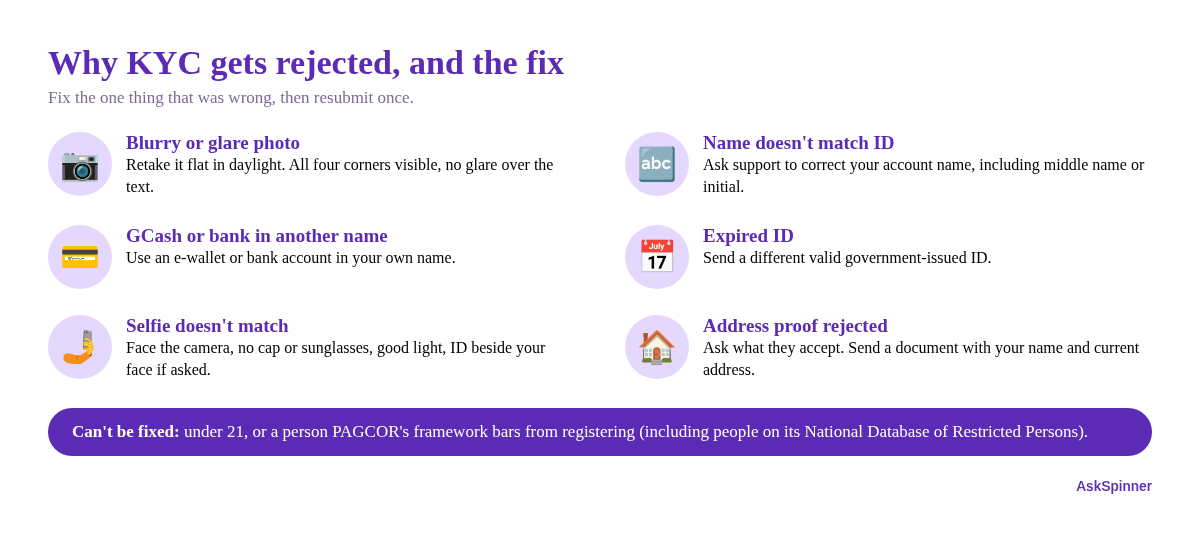
Blurry, cropped or glare-covered photo | Retake it flat on a dark surface in daylight. All four corners visible, no flash glare over the text. |
Name doesn't match the ID | Ask support to correct your account name to match the ID exactly, including middle name or initial. |
Name doesn't match your GCash or bank account | Use an e-wallet or bank account in your own name. Ask support how to update the payout account. |
Expired ID | Send a different valid government-issued ID. |
Selfie doesn't match the ID | Face the camera straight on, no cap or sunglasses, good light, ID held beside your face if asked. |
Address proof rejected | Ask support what they accept, and send a document showing your name and current address. |
Under 21, or a restricted person | Can't be fixed. See below. |
Some casinos ask for an extra document, such as proof of address or a second ID. If so, the request should come through the official site or support channel. Ask support exactly which documents they accept before you resubmit.
Step 1: Read the rejection reason
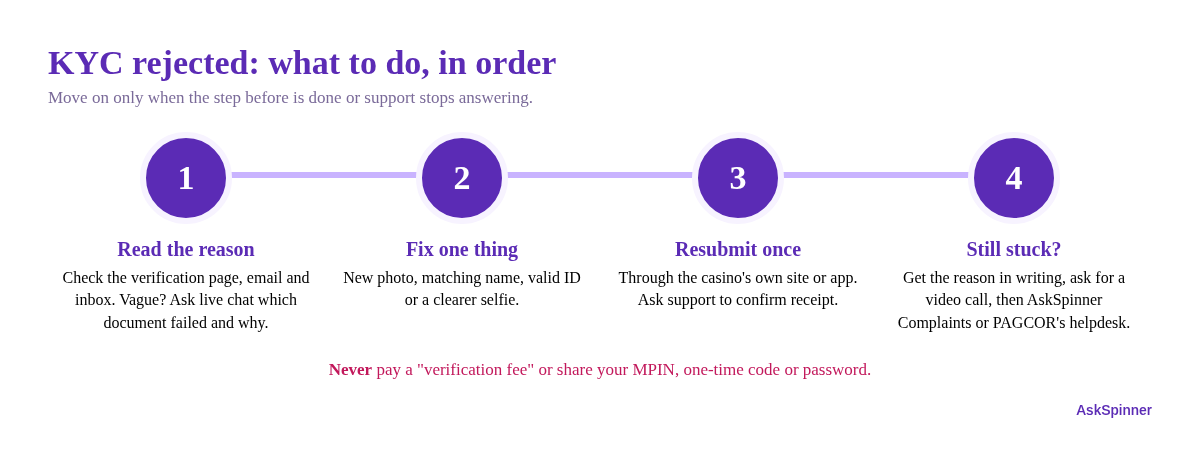
Check the verification page, your email and the casino inbox. If the message is vague ("documents not accepted"), ask live chat: "Which document was rejected, and why?" Don't resubmit until you know.
Step 2: Fix the one thing that was wrong
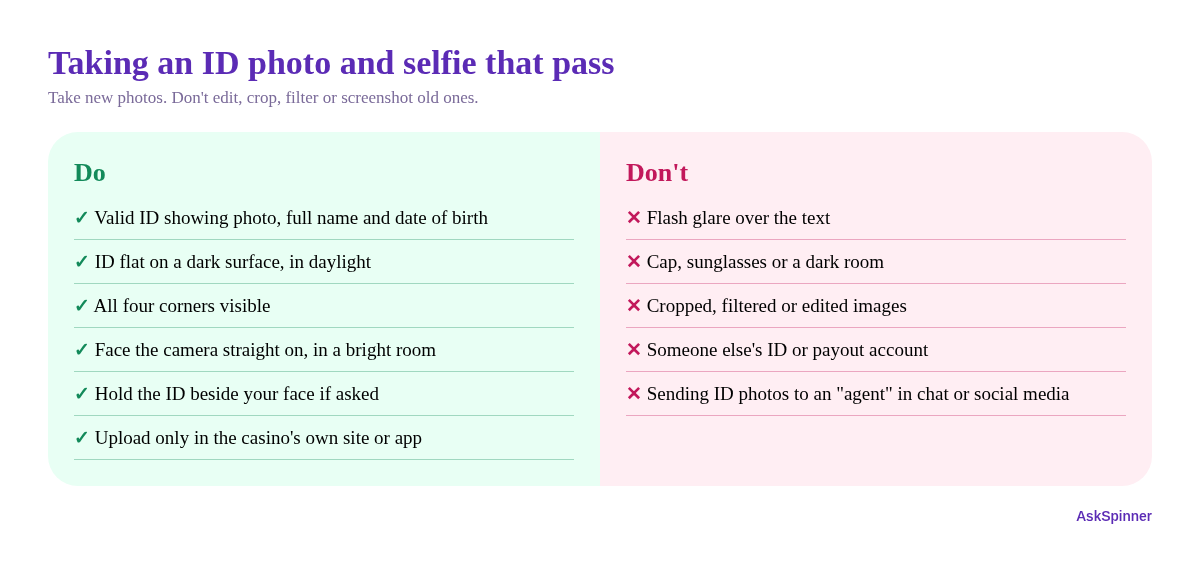
Photo problems: take a new photo instead of editing the old one. Don't crop, filter or screenshot an old image.
Name problems: your account name, ID and payout account should all show the same legal name. If your account name is wrong, ask support to change it. Don't open a second account.
Selfie problems: use the casino's own camera step if it has one, in a bright room. If a video call is offered, it can settle a mismatch quickly.
Step 3: Resubmit once, then confirm
Upload through the casino's own site or app only, never through a link someone sent you. Then message support: "I've resubmitted my KYC for [username]. Please confirm you received it." Save the chat and note the date.
Step 4: If you're rejected again or the account is locked
Ask support for the reason in writing and a ticket number.
Ask whether a video call verification is possible.
If the casino gives no reason, stops replying, or keeps your balance locked, submit a complaint to AskSpinner with screenshots of the rejections and your chats.
For PAGCOR-licensed casinos, you can also use the Online Gaming Platform Helpdesk on PAGCOR's official contact page.
When KYC can't be fixed
PAGCOR's framework only allows people aged 21 and above to register. It also bars government officials and employees connected with government operations, members of the Armed Forces and the Philippine National Police, and people listed in PAGCOR's National Database of Restricted Persons. If one of these applies, no resubmission will pass. Ask the casino how to close the account and return any deposit balance. If you're on the restricted list by your own choice, see responsible gambling.
Red flags: stop and don't pay
Someone asks for a "verification fee" or "unlock fee" to approve your KYC.
A "support agent" messages you first and asks for your ID photos in chat or on social media.
You're asked for your GCash MPIN, a one-time code or your password.
These are scams, not part of KYC. See gambling anti-fraud before you send anything.
Quick checklist
Got the exact rejection reason
ID is valid and shows photo, full name and date of birth
Account name, ID and payout account all match
New clear photo and selfie, no edits
Resubmitted once through the casino's own site or app
Asked support to confirm receipt and saved the chat
Escalated to AskSpinner Complaints or PAGCOR if still stuck
Other payment problems? See casino withdrawal successful but not in GCash and GCash charged but casino deposit not credited. Checking whether a casino is licensed? Read our PAGCOR licence guide.
FAQ
Can I play while my KYC is being reviewed?
It depends on the casino, but PAGCOR requires full KYC before your first withdrawal. Don't count on cashing out until it passes.
Can I use someone else's GCash account for withdrawals?
Don't. A payout account in another person's name is a common reason for rejection and holds. Use one in your own name.
Should I open a new account after a rejection?
No. Duplicate accounts break most casinos' terms and can get both accounts closed. Fix the original instead.
Is my ID data safe?
Licensed casinos must keep your data, and the Data Privacy Act gives you rights over it. Only upload through the casino's official site or app.
More Guides


PAGCOR Self-Exclusion: How to Apply Step by Step
Want to apply for PAGCOR self-exclusion? Choose 6 months, 1 year or 5 years, prepare your ID and photos, and send the form. Here's each step.
Casino Account Suspended or Frozen? How to Appeal
Casino account suspended, frozen or locked? Find out why, gather your evidence, and send a clear appeal to get access or your balance back.

Withdraw Before Wagering Requirements Are Met? What to Do
Want to withdraw before your casino bonus wagering is done? See what usually happens, when to cancel the bonus, and how to check the terms first.

GCash Charged but Casino Deposit Not Credited? What to Do
GCash or Maya took the money but your casino balance didn't go up? How to check the payment, what to send support, and how to get it posted or refunded.
Casino Withdrawal Successful but Not in GCash?
Casino says your withdrawal is successful or pending, but GCash is still empty after 24 hours? What to check, what to send support, and when to escalate.

Affiliate Disclosure
AskSpinner contains affiliate links and may earn a small commission from qualifying registrations. Our partnerships do not affect our rankings or reviews. All casinos are evaluated objectively based on expert reviews, Overall Score ratings, and real player feedback.
First Deposit Bonus Up to ₱900
Registration Bonus ₱20
Daily Task Rewards Up to ₱565
Coin Pusher Bonus Up to ₱2,000
First Deposit Bonus Up to ₱6