
Casino Withdrawal Successful but Not in GCash?


Casino withdrawal says successful but nothing in GCash? Here is what to check, what to send support, and when to escalate to GCash or PAGCOR.
Support keeps saying "please wait". This guide walks you through it one step at a time.
Check these three things first:
Your GCash Transactions list (not just SMS or app notifications).
The GCash number saved in your casino account. One wrong digit is enough to send the money elsewhere.
The exact status and reference number in the casino's withdrawal history.
What the casino status really tells you
A casino status only describes the casino's side. "Successful" or "Approved" usually means the casino has approved or released the payout. It does not prove the money has landed in GCash. Our fast withdrawal page makes the same point: an approved status is not the same as money received.
Status you see | What it usually means | What to do |
|---|---|---|
Pending | The casino has not finished reviewing your request. | Ask support which step is holding it and whether they need anything from you. |
Approved / Successful / Processed | The casino says it has released the payout. It may still be with a payment partner. | Ask for the payout reference number and the time it was sent. |
Rejected / Cancelled | The payout did not go through. | Check whether the balance went back to your casino account, and ask for the reason. |
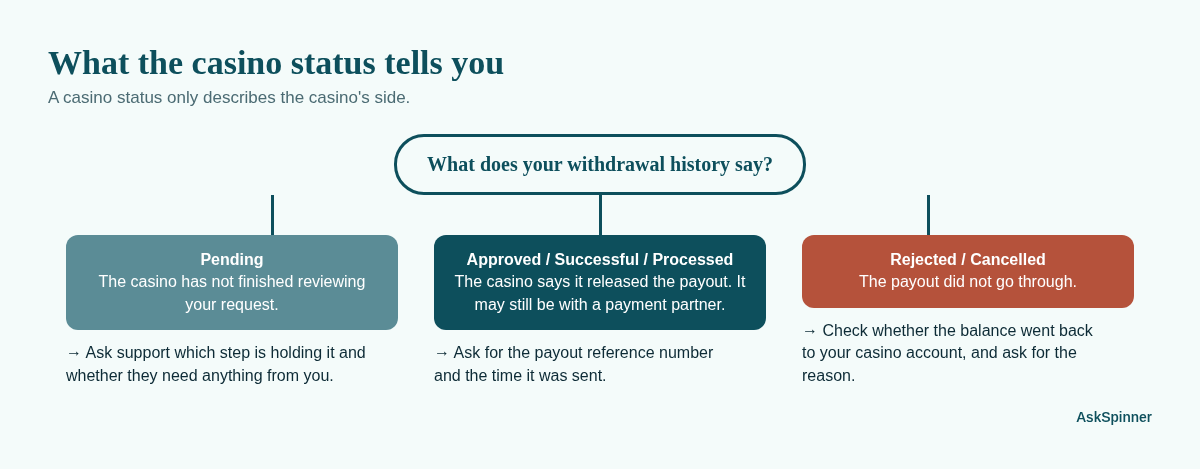
Different casinos use these words differently, so treat the table as a starting point, not a rule.
Step 1: Look in the right place in GCash
Open the GCash app and go to Transactions. Notifications can be late or missing, so the transaction list is the place to check.
Look for any incoming amount around the time of your withdrawal. It may show a payment partner's name rather than the casino's name.
Check your wallet limits. GCash says that if you go over your wallet limits, incoming money may bounce back to the sender. If you are near your limit, mention this to casino support.
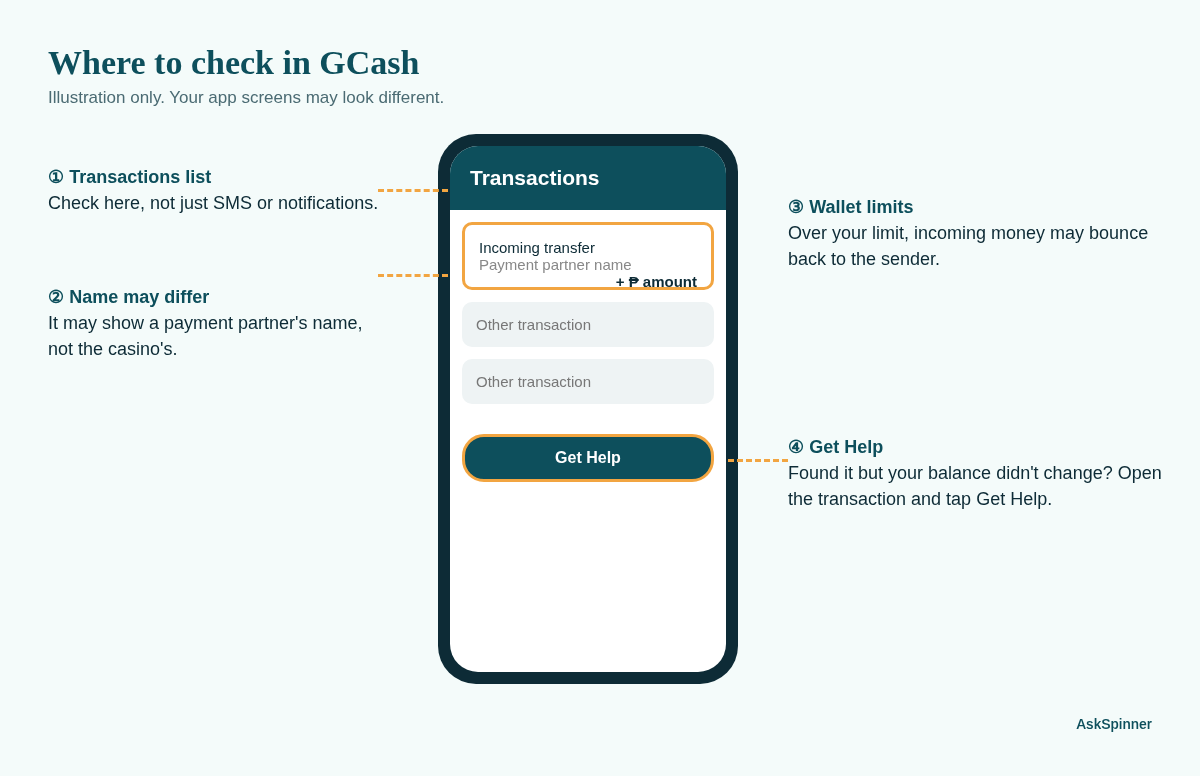
If you find the transaction but your balance did not change, this is a GCash issue. Open that transaction and tap Get Help (see Step 4).
Step 2: Confirm the GCash number on your casino account
Open your casino profile or payout settings and read the GCash number digit by digit. If it is wrong, tell casino support right away. GCash says it does not control refunds when money goes to the wrong number, so the casino and its payment partner are the ones who can trace it.
Also check that the name on your GCash account matches the name on your casino account. If they differ, ask support whether that could hold up the payout.
Step 3: Contact casino support with the right details
Send one clear message through the casino's official live chat or email, not through a "helper" who messaged you first. Include:
Withdrawal amount
Date and time you requested it
The status shown and the withdrawal or transaction reference number
The last 4 digits of the GCash number it should go to
A screenshot of the withdrawal history entry
Then ask three direct questions:
Has the payout actually been sent? At what time?
What is the payment partner's reference number for it?
If it is not sent yet, what is holding it and when will it be reviewed?
Ask for a ticket or case number and save the chat. If you post a screenshot anywhere public, hide your balance, full number and other transactions. Only the one transaction needs to show.
Step 4: Raise a ticket with GCash, if the money left the casino
Only do this once the casino confirms it sent the payout and gives you a reference number. GCash can't trace a payout that never left the casino.
If the transaction shows in GCash: open it in Transactions, tap Get Help, and choose the option that fits. This attaches the transaction details for you.
If nothing shows in GCash: use the GCash Help Center to submit a ticket under transaction issues. Give the amount, date, time and the reference number the casino gave you.
For money coming in from a bank or e-wallet, GCash's help article suggests waiting 2 business days before asking for help, and says support will contact you within 24 hours. A casino payout often goes through a payment partner, so this may not match your case exactly, but it gives you a fair idea of when to escalate.
Step 5: Escalate if support stops answering
If the casino keeps saying "please wait" with no reference number or time frame, you have two routes:
AskSpinner Complaints. Submit a complaint with your evidence. Our complaint expert can help you lay out the case clearly and contact the casino where possible.
PAGCOR, for licensed casinos. PAGCOR's official contact page has an Online Gaming Platform Helpdesk that lists withdrawal issues. Open the form only from that page, never from a link someone sends you. Have your casino ticket number ready.
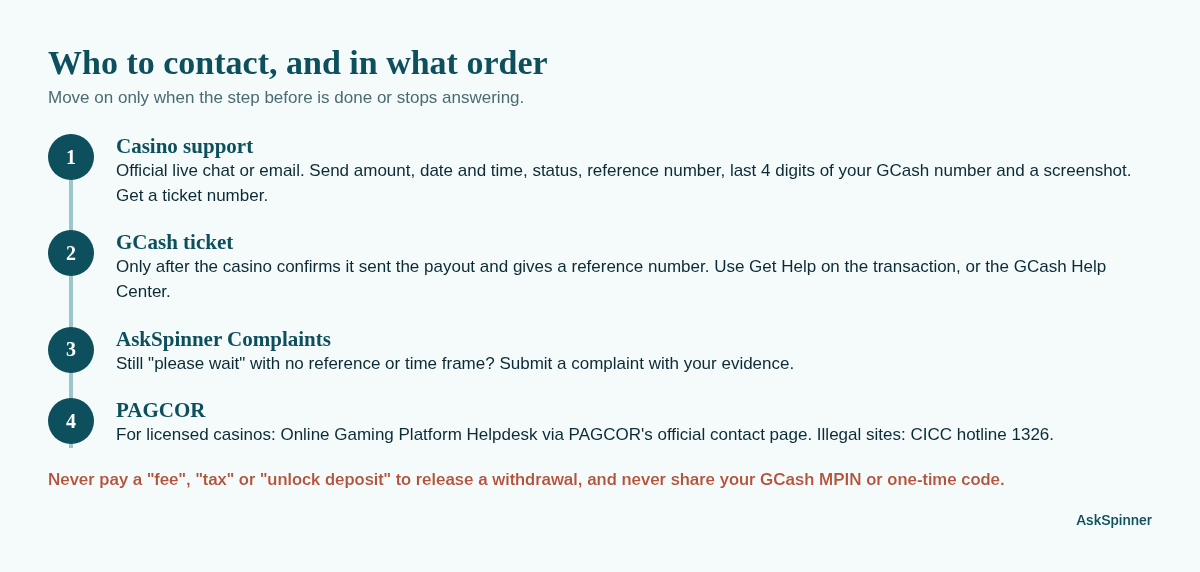
Not sure the casino is licensed? Check it on PAGCOR's official verification site (linked from the same contact page) before you send it any more money. For illegal sites, PAGCOR's page points to the CICC hotline 1326.
Red flags: stop and don't pay
Support asks you to pay a "fee", "tax" or "unlock deposit" to release your withdrawal.
Someone in a chat or group offers to "speed up" your payout for a charge.
You are asked for your GCash MPIN or a one-time code.
These are signs of a scam, not a payment delay. Read Asked to pay before withdrawing? before you do anything else.
Quick checklist
Checked GCash Transactions, not only SMS
Checked wallet limits
Confirmed GCash number and name on the casino account
Got the casino's payout reference number and send time
Saved the support chat and ticket number
Raised a GCash ticket only after the casino confirmed it was sent
Escalated to AskSpinner Complaints or PAGCOR if there is still no answer
Want to see how payouts usually work before you play? Read our GCash online casinos page.
FAQ
Does "Successful" mean GCash already has my money?
Not always. It usually means the casino approved or sent the payout. Your money has only arrived once it shows in your GCash Transactions and balance.
How long should I wait before I complain?
Start with the time the casino itself states for GCash payouts. If that time has passed and support gives you no reference number, contact them with the details above. There is no single official waiting period for casino payouts.
Should I make a new withdrawal request?
Not before the casino confirms what happened to the first one. A second request can make the records harder to trace.
Can GCash reverse or chase the payout for me?
GCash can look into a transaction that reached its system. If the casino never sent the money, only the casino can fix it.
More Guides


PAGCOR Self-Exclusion: How to Apply Step by Step
Want to apply for PAGCOR self-exclusion? Choose 6 months, 1 year or 5 years, prepare your ID and photos, and send the form. Here's each step.
Casino Account Suspended or Frozen? How to Appeal
Casino account suspended, frozen or locked? Find out why, gather your evidence, and send a clear appeal to get access or your balance back.

Withdraw Before Wagering Requirements Are Met? What to Do
Want to withdraw before your casino bonus wagering is done? See what usually happens, when to cancel the bonus, and how to check the terms first.

Casino KYC Verification Rejected? How to Fix and Resubmit
Casino KYC verification rejected? Find the reason, fix the photo, name, ID or selfie problem, resubmit once, and know what to do if you keep getting rejected.
GCash Charged but Casino Deposit Not Credited? What to Do
GCash or Maya took the money but your casino balance didn't go up? How to check the payment, what to send support, and how to get it posted or refunded.
Affiliate Disclosure
AskSpinner contains affiliate links and may earn a small commission from qualifying registrations. Our partnerships do not affect our rankings or reviews. All casinos are evaluated objectively based on expert reviews, Overall Score ratings, and real player feedback.
First Deposit Bonus Up to ₱900
Registration Bonus ₱20
Daily Task Rewards Up to ₱565
Coin Pusher Bonus Up to ₱2,000
First Deposit Bonus Up to ₱6